YOUR MUSIC. A WHOLE NEW MOOD.
Turn your audio
into a vibe.
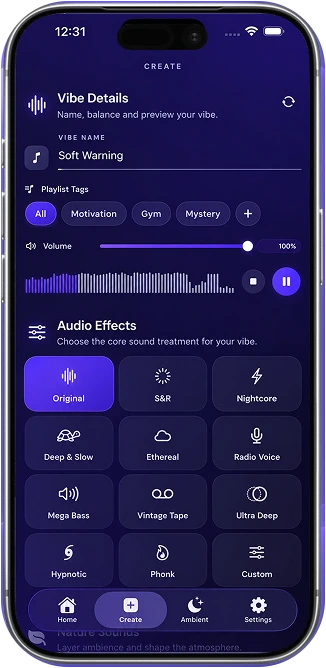
Slow it down. Let it echo. Add a little rain.
Make the music you love feel entirely yours.
Made for iPhone · Free to download
A DIFFERENT KIND OF FEELING
Hear the difference.
Feel the vibe.
A little slower. A little deeper. Entirely different.
A slower pace. A little more space. A whole new feeling.
Loading preview…
FIND YOUR SIGNATURE SOUND
One tap.
Or total control.
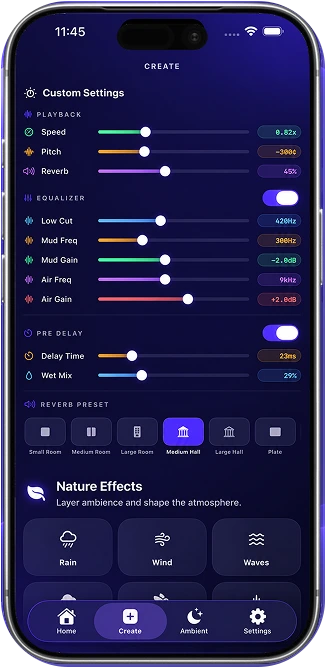
Start with a feeling. Get there with a preset.
Then make every detail your own.
Speed, pitch, reverb, EQ, and more. Preview changes in real time in the app. Advanced controls require Premium.
Find your sound ↗MORE THAN MUSIC. A PLACE TO BE.
Set the ambience.
Shape your vibe.
A favorite song. A distant storm. A moment that feels
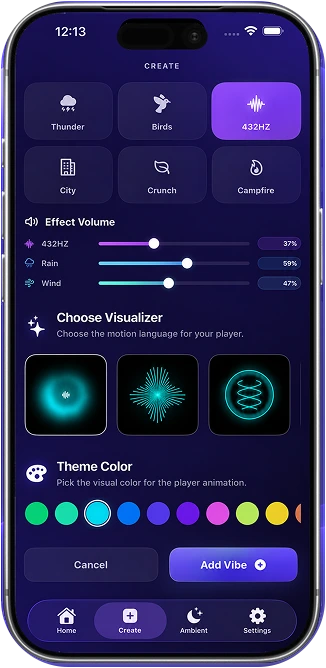
like yours. Layer nature into your listening.
A rainy night. Anywhere.
Soften the edges of your favorite track with a layer of rain.
Explore the moods here. Hear and mix nature sounds in the app.
YOUR IDEA. OUT IN THE WORLD.
From creation
to export.
That sound in your head? Make it real.
Your next edit is only a few steps away.
- 01
Bring your sound.
Import personal audio, or record something new.
- 02
Make it a vibe.
Choose effects, fine-tune the details, and layer ambience.
- 03
Take it with you.
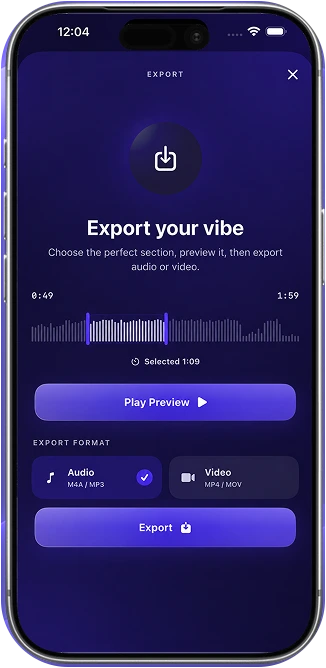
Preview your favorite moment. Export M4A audio or an MP4 visualizer video.
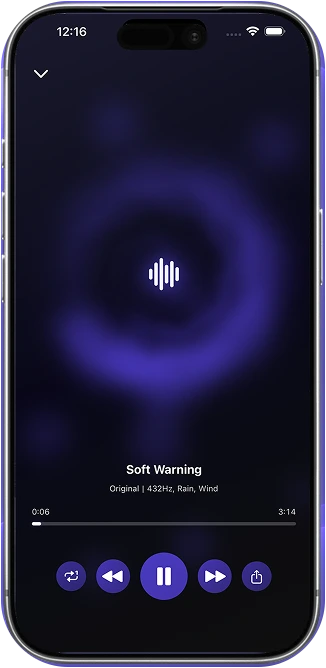
PRESS PLAY. FIND YOUR SPACE.
Your sound.
Your space.
Some songs deserve your full attention. Save your creations, organize your playlists, and settle into a player that feels as good as it sounds.
- Music visualizers that move with your audio
- Your creations, ready for another listen
- Themes that match your mood
SLOWVIBEMAKER PREMIUM
Make every sound
your own.
More room to experiment.
More ways to express yourself.
- Unlimited vibe creation & exports
- Advanced audio effects & EQ
- Custom effect editing
- Premium themes, colors & animations
- An ad-free experience
Explore plans and current pricing in the app.
A FEW THINGS TO KNOW
Good questions.
Clear answers.
Get to know your next creative space.
What is SlowVibeMaker?
Your pocket studio for changing the mood of audio. Create slowed + reverb and nightcore edits, fine-tune effects, layer nature sounds, and enjoy your creations with animated visualizers.
Can I use it for free?
Yes. SlowVibeMaker is free to download with in-app purchases. Ambient Mode’s nature sounds are free. Premium offers unlimited vibe creation and exports, advanced effects, custom editing, and more. Check the app for current plans and limits.
How do I make a slowed + reverb edit?
Import an audio file or record something of your own, choose the slowed + reverb effect, then preview it. Adjust the speed, pitch, and reverb until it feels right, and save or export your vibe.
Can I import my own audio?
Yes. Import audio files from your device, record inside the app, or extract audio from a video. Only use content you have the right to edit and share.
Can I add rain and nature sounds?
Yes. Layer rain, wind, waves, thunder, birds, campfire, and other sounds. Adjust their individual volumes to build your atmosphere. You can also use Ambient Mode without importing music.
Can I customize speed, pitch, and reverb?
Yes. Start with an effect preset or use custom controls for speed, pitch, reverb, EQ, and more. Advanced audio effects, EQ controls, and custom effect editing are Premium features.
Can I export audio and video?
Yes. Export M4A audio or create an MP4 video with an animated visualizer. Preview your selection before exporting. Export availability and limits depend on your plan.
Which devices are supported?
SlowVibeMaker is designed for iPhone and requires iOS 17.6 or later. See the App Store for current device compatibility.
A DIFFERENT FEELING IS A TAP AWAY.
Your next favorite vibe
starts here.
Slow it down. Change the mood. Make it yours.
Download on theApp Store Made for iPhone. Made for your kind of music.